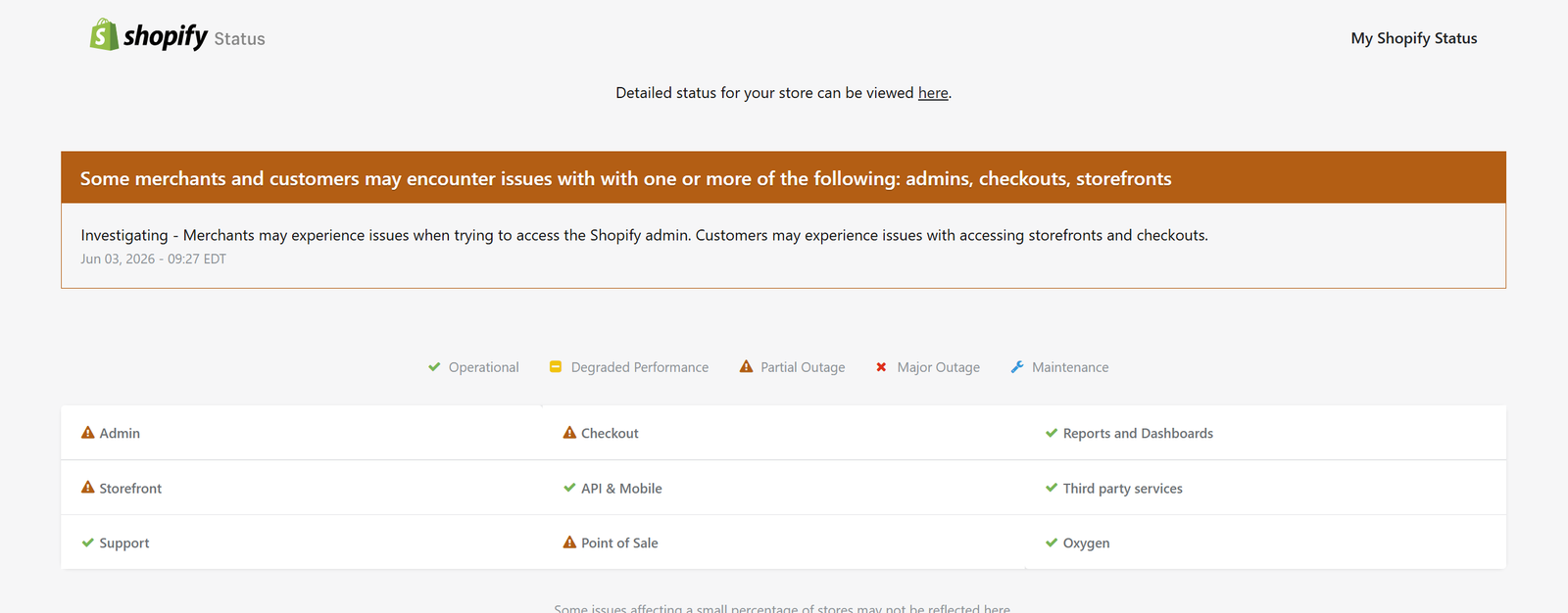
Many Shopify merchants and customers are reporting the “This Store Does Not Exist” error today, Wednesday, June 3, 2026. This message typically appears when attempting to access a Shopify-powered store that is unavailable, disabled, transferred, deleted, or experiencing platform-related issues.
If you’re seeing:
“This Store Does Not Exist”
don’t panic. In most cases, the issue can be identified and resolved quickly.
The Shopify error message indicates that Shopify cannot locate an active store associated with the domain or subdomain being accessed.
Common examples include:
mystore.myshopify.com showing “This Store Does Not Exist”
Custom domain redirects failing
Store unavailable after account changes
Shopify store suspension
DNS configuration issues
Store transfer problems
Before troubleshooting, check whether Shopify is experiencing a platform-wide outage.
Signs of a Shopify outage include:
Multiple stores displaying identical errors
Shopify Admin inaccessible
Checkout failures
Domain connection issues
Slow loading storefronts
If multiple merchants report problems simultaneously, the issue may be related to Shopify infrastructure rather than your individual store.
The most common reason is entering the wrong store URL.
Examples:
Incorrect:
yourstoree.myshopify.com
your-store.myshopify.com
Correct:
yourstore.myshopify.com
Always verify the exact Shopify subdomain.
If a Shopify store has been permanently closed or deleted, visitors will see the “This Store Does Not Exist” message.
Possible reasons include:
Merchant closed the business
Trial account expired
Store deletion request processed
Account termination
Custom domains may lose connection due to:
DNS changes
Expired domains
Incorrect A records
Broken CNAME settings
Verify domain settings with your registrar.
Shopify may restrict access to stores that violate platform policies.
Common causes:
Payment disputes
Policy violations
Fraud investigations
Intellectual property complaints
Store owners should contact Shopify Support directly.
During ownership transfer:
Domains may temporarily disconnect
Store URLs may change
DNS propagation delays may occur
This can trigger temporary “Store Does Not Exist” messages.
If billing issues occur:
Store access may be restricted
Checkout can become unavailable
Visitors may encounter storefront errors
Verify payment information in Shopify Admin.
Double-check:
Spelling
Hyphens
Subdomain format
Custom domain configuration
Try accessing:
yourstore.myshopify.com
If it loads, the issue likely involves the custom domain.
Confirm:
A Record:
23.227.38.65
CNAME:
shops.myshopify.com
Incorrect DNS settings commonly cause storefront failures.
Expired domains often produce errors that appear similar to Shopify store failures.
Check:
Renewal status
Registrar account
DNS management settings
Try:
Incognito mode
Different browser
Different device
Mobile network
Sometimes cached DNS records create temporary issues.
If none of the above works:
Gather screenshots
Note the exact URL
Record error timestamps
Contact Shopify Support
Providing detailed information speeds up troubleshooting.
Shopify merchants can seek help through:
Shopify Help Center
Shopify Admin Support
Live Chat
Community Forums
Email Support Options
Prepare:
Store URL
Domain information
Error screenshots
Recent account changes
The duration depends on the cause.
| Cause | Typical Resolution Time |
|---|---|
| DNS Propagation | 1–48 Hours |
| Domain Renewal | Minutes to 24 Hours |
| Billing Issue | Immediate After Payment |
| Store Transfer | Several Hours |
| Shopify Outage | Until Resolved |
| Deleted Store | Permanent |
This usually occurs due to domain issues, billing problems, store transfers, deletion, suspension, or incorrect URLs.
No. Customers generally cannot access the storefront until the issue is resolved.
Not necessarily. Many cases involve DNS errors or temporary account issues rather than permanent deletion.
Recovery depends on account status, timing, and Shopify policies. Contact Shopify Support immediately if accidental deletion occurred.
Check Shopify’s official status resources and merchant reports to determine whether a broader outage exists.
The Shopify “This Store Does Not Exist” error can be alarming, but it is usually caused by URL mistakes, domain problems, billing issues, ownership transfers, or temporary Shopify service disruptions.
By verifying your store URL, checking DNS records, reviewing billing status, and contacting Shopify Support when necessary, most merchants can restore access quickly.
For ongoing updates regarding Shopify outages, domain issues, and store availability, continue monitoring Shopify support channels and your domain provider.